The Digistar Program by LivinginTelkom is designed to help young digital talent grow and develop their skills to become future leaders. This program provides opportunities for participants to enhance their careers through workshops, mentorship, and industry insights, preparing them to face global challenges.
Context
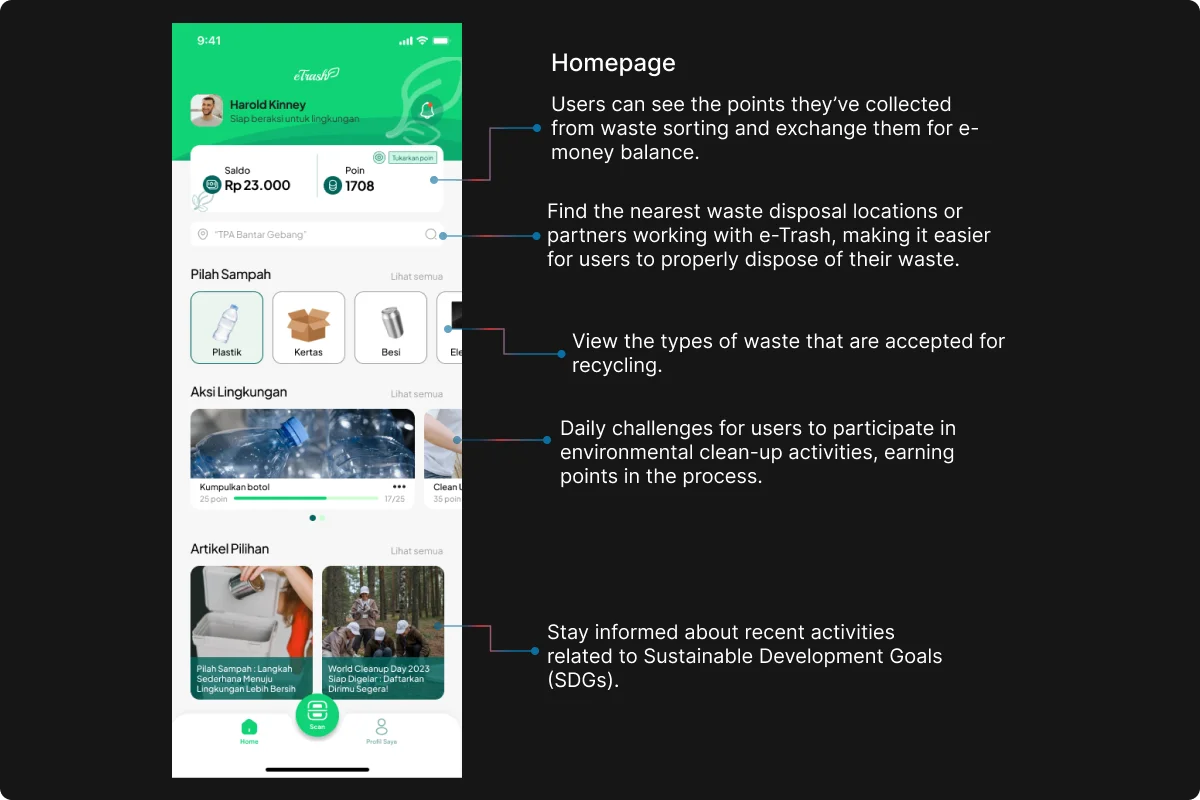
As part of the Digistar Program, I designed the UI/UX for a project focused on promoting Sustainable Development Goals (SDGs). The app encourages users to engage in environmental actions by providing features like a trash scanning function, a map showing recycling locations, and articles related to sustainability.
Users can earn points through daily “Environmental Actions,” which can later be redeemed for e-money within the app, motivating them to participate in sustainable practices and support the SDGs.
Details
Time Frame:
2023
Role:
UI/UX Designer
Involvement:
Mobile app design
Style Guide
The style guide ensures design consistency by setting clear standards for typography, colors, icons, spacing, and more. It helps maintain a cohesive brand identity and ensures a seamless, user-friendly experience across all platforms. This guide also serves as a reference for future design updates.
Low Fidelity
Low fidelity designs are simple, rough representations of the layout and structure of a product. They focus on functionality and user flow, without detailed design elements like color, images, or typography. These designs are used early in the process to quickly test concepts and gather feedback before refining the details.
High Fidelity
High fidelity designs are detailed and polished versions of the product. They include all visual elements such as colors, typography, images, and interactive components. High fidelity designs closely resemble the final product and are used for user testing and to guide development.
Prototype
Here’s the interactive prototype! You can navigate through various screens to experience the user flow firsthand. This prototype demonstrates the design’s functionality, shows how different elements interact, and gives you a preview of the overall user experience. It’s designed to simulate how the final product will function and allows for an interactive preview of the interface and interactions before development begins.